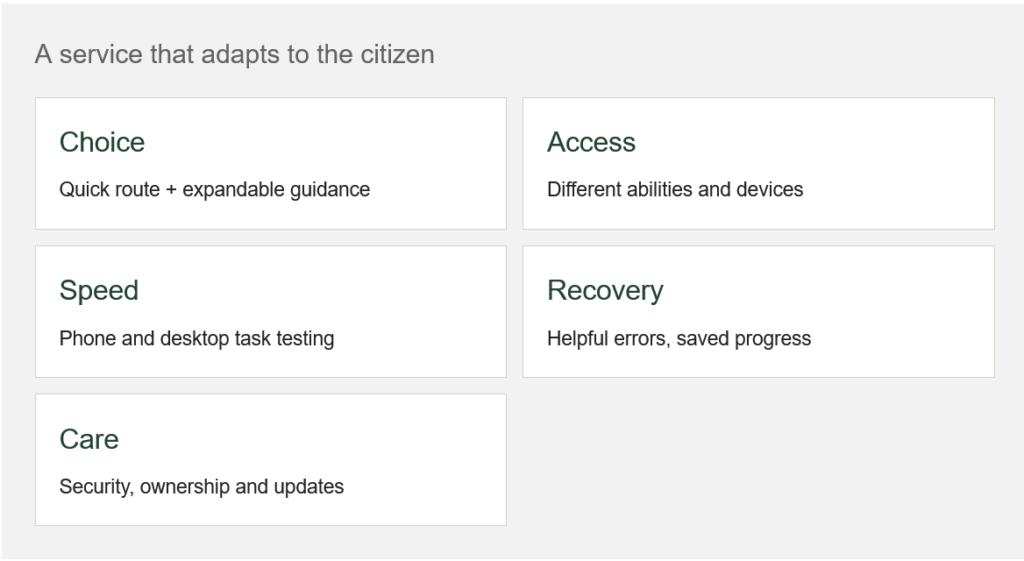
A public website can be welcoming, visually engaging and dependable. Design the experience around what citizens need to accomplish, rather than making them learn the organisation chart.
1. Offer expandable assistance. Confident users need a direct route; others need examples, explanations and guided steps. Let people choose the depth of support without hiding essential requirements.
2. Build accessibility into the service. Use readable text, keyboard-friendly controls, meaningful labels and accessible documents. WHO’s 2023 fact sheet estimated significant disability affects 16% of the world’s population. Age and digital confidence add further reasons to test with varied users.
3. Make speed a service priority on phones and desktops. Test older devices and slower connections. Core Web Vitals provide useful benchmarks, but also time the complete application journey.
4. Make validation helpful. Explain document and format requirements before entry. Preserve answers, identify the field that needs attention and give a specific correction. Provide save-and-resume where appropriate and a clear submission reference.
5. Fund security and regular updates. Assign responsibility for patching, access reviews, content accuracy, backups and incident handling. Explain data use plainly. A launch budget without an operating budget leaves the service exposed to avoidable decay.
A number worth understanding
16%
WHO’s 2023 fact sheet estimate of the global population experiencing significant disability. This is population context, not a website accessibility score.
Source: World Health Organization, Disability fact sheet, 7 March 2023